REVIEW · SEOUL
South Korea: Unlimited Data and Voice eSIM
Book on GetYourGuide →Operated by LINK KOREA · Bookable on GetYourGuide
Instant data beats airport SIM drama. This South Korea eSIM gives you unlimited 4G LTE data on SK Telecom and can add voice and SMS after passport verification.
The catch: you need a phone that supports eSIM, and voice features take extra steps. If you hit a snag, you may spend time in settings checking what activated.
In This Review
- Key things that matter before you land
- How This SK Telecom eSIM Gets You Online Fast
- QR Codes, Email Delivery, and the Real Activation Timeline
- Unlimited 4G LTE Data: Speed, Hotspots, and Reality
- Voice and SMS: When It Turns On and What You Actually Get
- Validity Windows (3 to 90 Days): Pick the Right One
- Device Checks That Save You Stress (EID, Carrier Lock, Settings)
- Troubleshooting When Things Go Off the Rails
- Value at $8: Who This Fits Best
- Should You Book This eSIM Service?
- FAQ
- How do I get the correct eSIM QR code?
- When does the eSIM start working in Korea?
- Can I use the eSIM for voice and SMS?
- What are the passport verification hours for voice and SMS?
- Can I use the eSIM as a hotspot?
- What is the cancellation policy?
Key things that matter before you land
- Unlimited data on a major carrier (SK Telecom / 4G LTE), with no speed throttling
- Instant data activation after you arrive, once your eSIM is connected to SKT’s network
- Hotspot sharing is supported, so you can connect more than one device
- Voice calls and SMS use a Korean phone number, but only after online passport verification
- Validity ranges from 3 to 90 days, with activation based on the hour you connect
- Support from LINK KOREA if QR/setup goes sideways
How This SK Telecom eSIM Gets You Online Fast
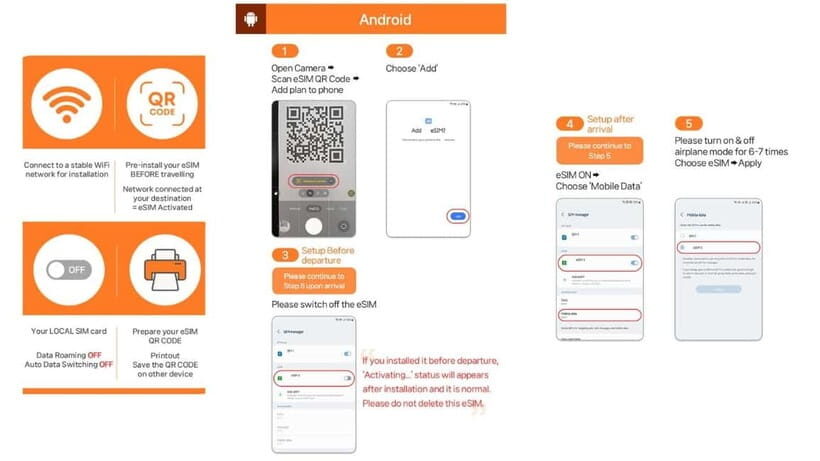
This is a straight-to-the-point South Korea data plan. You buy once, then you install an eSIM, then your phone uses the local SK Telecom network. No roaming math. No switching SIMs in and out. If you care about staying connected for maps, translation, messaging, and tickets, this setup is a practical choice.
Two things I like a lot are the unlimited 4G LTE promise and that it’s tied to a real local carrier (SK Telecom). That combination usually means fewer weak-signal surprises compared to some off-brand data cards. The second big plus is the optional add-on of voice and SMS. Even if you think you only need data, having a local number can save you if a hotel, restaurant, or transport service insists on texting.
The one consideration: you are depending on your phone’s eSIM behavior. If your device is picky, voice activation can become a small project. The good news is the plan is designed to get data working immediately, then add voice/SMS after verification.
You can also read our reviews of more tours and experiences in Seoul.



QR Codes, Email Delivery, and the Real Activation Timeline
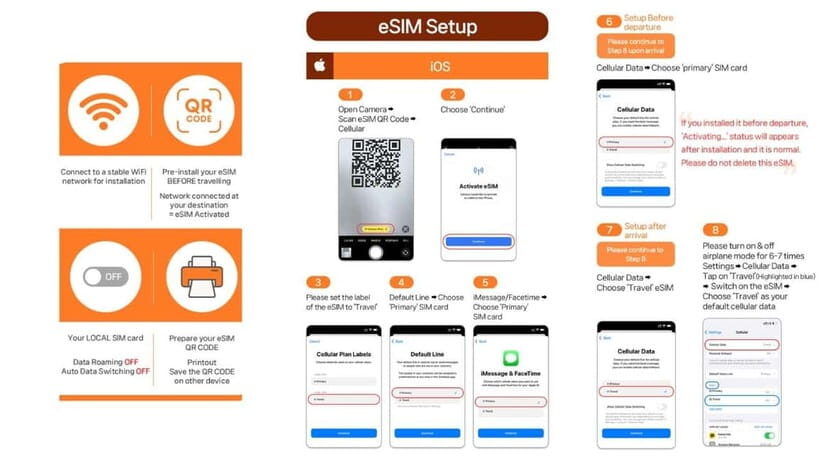
Plan your timing around the fact that the QR code in your voucher is not the eSIM QR code. You’ll get the real eSIM QR code separately by email about one day before your activity date. That matters because it changes how you should prepare.
Here’s the practical sequence you should follow:
- Before departure: make sure your phone supports eSIM (more on this below).
- Day-before window: watch your email for the eSIM QR code.
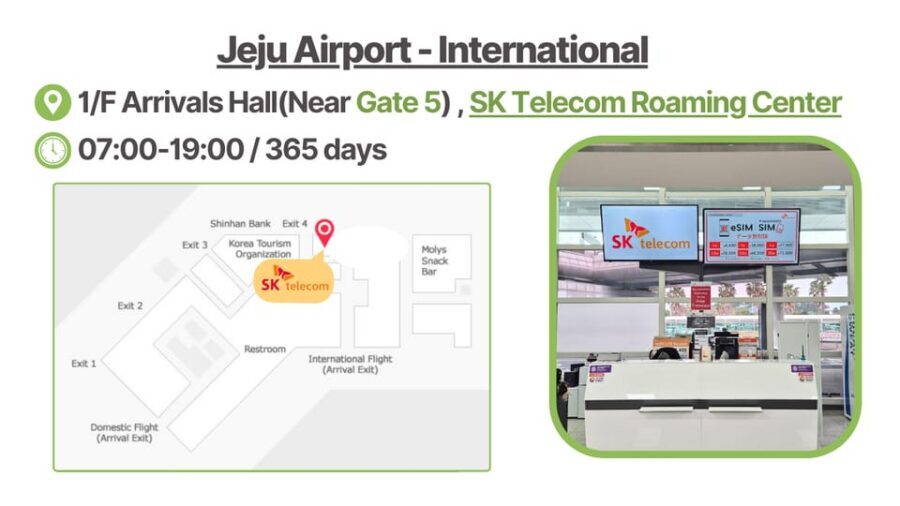
- After you arrive in Korea: your eSIM can connect and start working, once it’s able to reach SKT’s network.
- Voice/SMS (optional): after you’ve arrived, you do online passport verification during the allowed hours.
Also note the plan’s pacing. The eSIM starts instantly when connected to SK Telecom’s network, based on hours. So a 3-day plan is not “3 days from when you install.” It’s more like “3 days from the moment it activates on SKT’s network,” with cutoffs that can happen at the same hour each day. That’s normal for telecom products, but it’s worth respecting so you don’t lose days you thought you had.
Unlimited 4G LTE Data: Speed, Hotspots, and Reality
The headline is unlimited data without speed throttling. In real travel life, that means you can treat your phone like you live there: maps on, uploads for photos if you want, constant messenger use, and repeated searches when you miss a street.
This plan also supports hotspot sharing. That can be a lifesaver if you have a tablet, a second phone, or a travel laptop you actually plan to use. Just remember that “unlimited” typically refers to your eSIM data plan, not that your other device magically gets unlimited quality forever. Still, having the option to share is a big value boost.
One more detail that helps you set expectations: voice and SMS are separate from data. Before verification, the eSIM is for data services only. So if your first goal is to message someone by phone number, you’ll want to complete the activation steps early in the trip.
Voice and SMS: When It Turns On and What You Actually Get
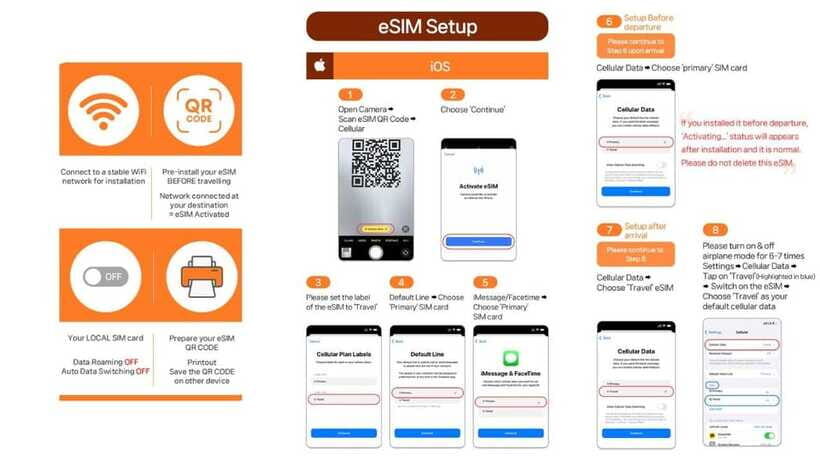
Voice and SMS are available after online verification, and the plan provides a Korean phone number once you complete that process. You’ll do it through SK Roaming’s passport verification system. The site runs daily 08:00–22:00, and verification can only be performed one hour after entry.
So the practical advice is simple: don’t wait until late evening after a long flight and expect voice to turn on instantly. If you land and immediately want calls or texts, start the verification process within that window.
What you get after activation:
- Voice calls and SMS can be enabled after verification
- You receive a Korean phone number
- There’s a complimentary 1,320 KRW voice credit (stated as valid until DRP 20), which is roughly about 5 minutes of domestic calls in Korea
And what you don’t get:
- Incoming calls and texts are included without extra charges
- Outgoing calls and outgoing SMS are not included, based on what’s listed for the plan
That “incoming included, outgoing not included” detail is easy to misunderstand. If you plan to make lots of calls, this isn’t a unlimited calling plan. It’s more like a local-number add-on so you can receive communications easily and use voice within the credited amount unless you recharge in a way the plan allows.
Also plan for charging if you want call minutes beyond the included credit. The data plan gives you the voice feature after verification, but you still need to recharge online before using the call feature after it activates.
Validity Windows (3 to 90 Days): Pick the Right One
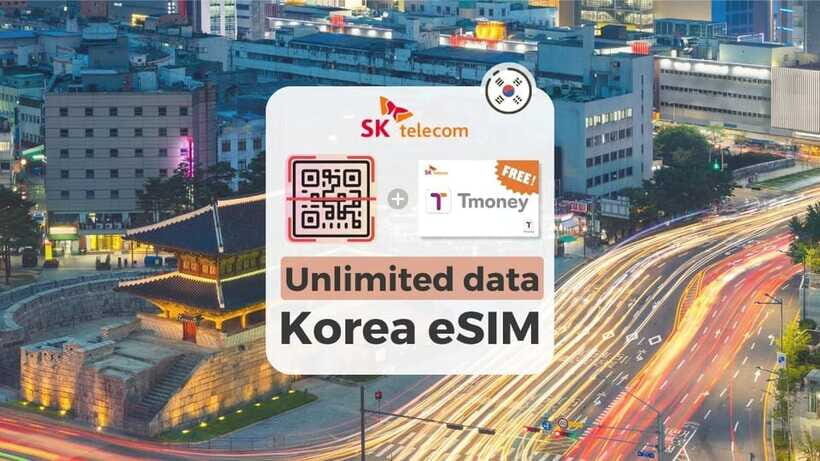
The plan comes in options from 3 to 90 days. If you’re on a short trip, the 3-day or 7-day style of product usually makes sense. If you’re moving around for weeks, longer validity can prevent the hassle of redoing setup mid-trip.
The tricky part isn’t the number of days. It’s the activation timing. The plan says the eSIM starts instantly when connected to SKT’s network, based on hours (it even gives an example with a specific hour-to-hour cut). In practice, that means:
- If you connect the eSIM early on day one, you start the countdown.
- If you connect later in the day, your end date shifts later too.
- If you plan to travel across time zones or delay activation, expect the validity window to follow the activation moment.
If you’re the type who likes to land and get going immediately, you’ll probably get the full value of your selected days. If you tend to wait until you’re fully checked in, you might eat into your planned time without noticing.






Device Checks That Save You Stress (EID, Carrier Lock, Settings)
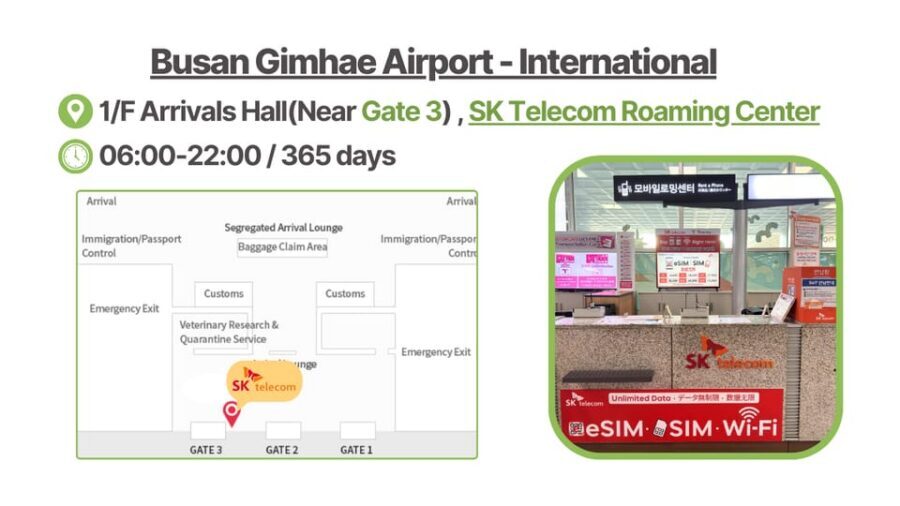
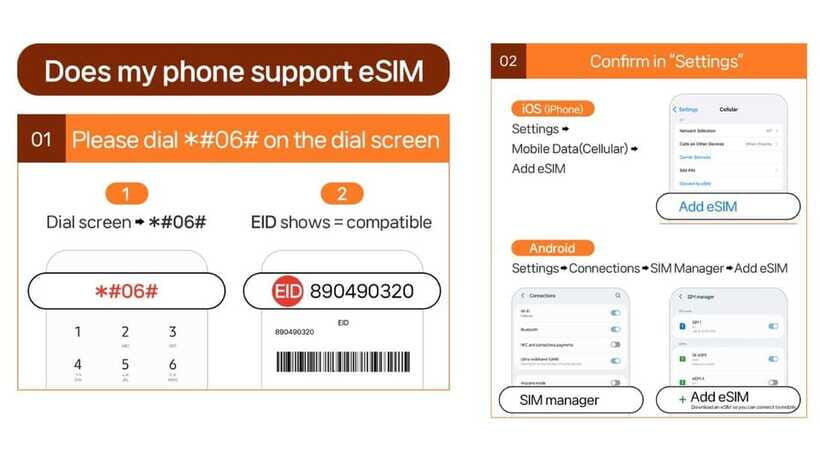
This is the part that prevents most headaches.
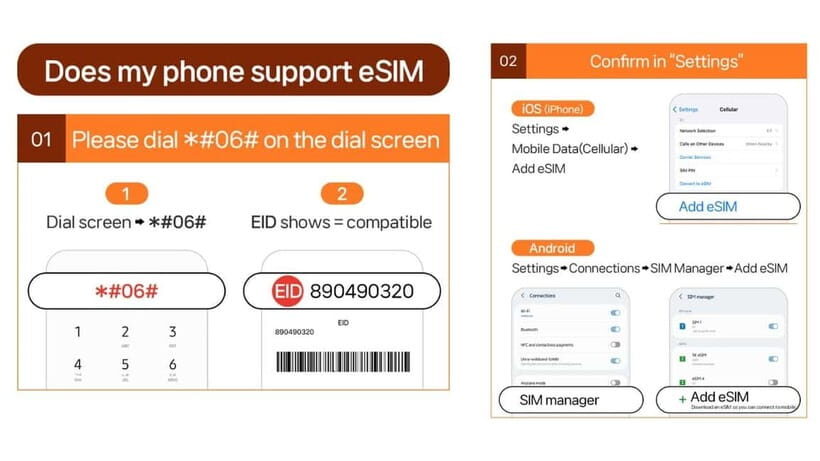
Before you buy, confirm your phone supports eSIM. The simplest test listed is:
- Dial *#06# and check for an EID
- If no EID shows, your device is likely incompatible
Also make sure your phone is compatible with a foreign carrier/eSIM. The plan explicitly advises making sure your device is fully able to use a foreign SIM/eSIM. It flags that phones from the United States, Canada, Japan, or the Philippines may need extra attention.
Finally, when activation troubleshooting is needed, the plan tells you exactly where to look:
- iOS: Settings > Cellular (or Cellluar as written) and check for an eSIM entry
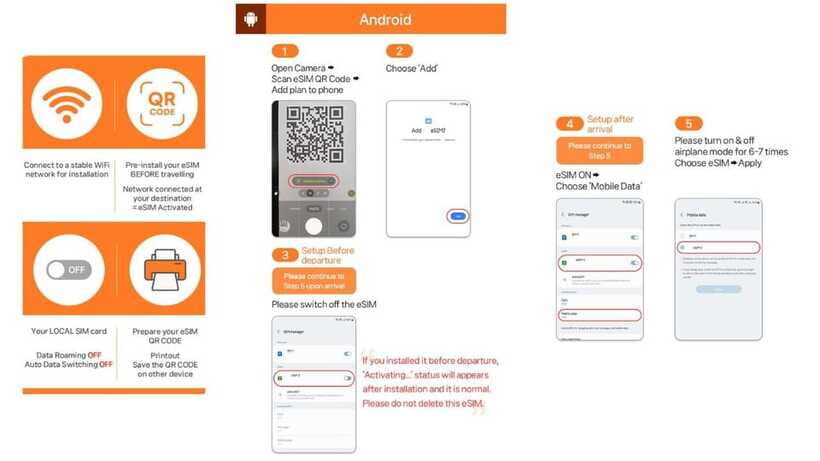
- Android: Settings > Connections > SIM Manager and check for a new eSIM
That matters because when something goes wrong (like seeing an invalid QR message), you can fix it by confirming whether the eSIM profile is actually installed on your device, not just whether the QR scanned.
Troubleshooting When Things Go Off the Rails
Despite the straightforward design, eSIM setup can be smooth or it can become a slow-motion headache. One reason: you can install the eSIM profile, but the network connection or timing can still fail.
If you see errors like QR code invalid:
- First check whether a new eSIM shows up in your settings (the plan’s own instructions point you there)
- If it shows, you may just need to reconnect or re-check the correct mobile data line
- If it doesn’t show, the issue is usually with installation rather than the carrier
If you truly get stuck, you should use support quickly rather than trying random fixes for hours. The provider lists contact options through LINK KOREA:
- Email: [email protected]
- WhatsApp: https://wa.me/message/R7WRWPD6T67UM1
And yes, it’s worth knowing what to expect from staff. In some cases, setup guidance can be quick and the signal is stable right away. In other cases, installation takes longer and the data connection can drop until adjustments are made. Having the provider contact ready helps you move faster when you hit a rough patch.
Value at $8: Who This Fits Best
At $8 per person, this can be an excellent value if your priority is staying online all day. Unlimited data is the big driver of value, especially in a country where you’ll use your phone for wayfinding, transit, and quick checks all the time.
This is a good match if you:
- Want an eSIM and don’t want to hunt for a physical SIM
- Plan to rely on data heavily (maps, chat apps, translations)
- Care about a stable connection on a major local carrier (SK Telecom)
- Are okay handling voice/SMS verification steps if you actually need a local number
It’s not a great fit if:
- Your phone doesn’t show an EID or your device is uncertain about eSIM support
- You expect unlimited outbound calling or nonstop calling minutes
- You’re on a longer stay (91 days or more). The plan warns that long-term residents may be limited or suspended without prior notice, and refunds won’t be issued in that case.
One more eligibility note: only foreigners with an overseas passport can buy. Korean passport holders can’t purchase this product.
Should You Book This eSIM Service?
If your goal is simple and you’re ready to do a quick device check, I think it’s usually a smart buy. The plan is designed to get you unlimited 4G LTE data working after arrival, and that alone covers most traveler needs.
My rule of thumb:
- Book it if you have a compatible phone and you want data-first coverage.
- Skip or be cautious if you need voice calls on day one and you might miss the passport verification timing window.
Before you land, do these two small moves:
- Make sure you have the eSIM QR code ready in email about a day before your activity date.
- Keep at least a little patience for settings work. If your phone needs manual attention, it can take time, but the provider support contact is there for a reason.
FAQ
How do I get the correct eSIM QR code?
The voucher QR code is not the eSIM QR code. The eSIM QR code is delivered separately to your email about 1 day before the activity date.
When does the eSIM start working in Korea?
The eSIM connects to the local network after you arrive in Korea. It starts instantly when it connects to SK Telecom’s network, based on the activation hour.
Can I use the eSIM for voice and SMS?
Voice and SMS are available after online verification. The plan provides a Korean phone number after verification. Before verification, the eSIM is for data services only.
What are the passport verification hours for voice and SMS?
The operating hours are 08:00–22:00 every day, and verification can only be performed 1 hour after entry.
Can I use the eSIM as a hotspot?
Yes. Hotspot sharing is supported.
What is the cancellation policy?
You can cancel up to 24 hours in advance for a full refund. After the eSIM is issued, eSIM cannot be refunded.