REVIEW · SEOUL
South Korea eSIM (3-30 days. Up to 45GB)
Book on Viator →Operated by Xplori · Bookable on Viator
A good connection beats most Seoul plans. This South Korea eSIM is a simple way to get 4G/5G data at local rates without hunting for a SIM card, and it starts working within minutes after you activate it. What I like is the quick setup by email + QR code, and the automatic network selection that helps you stay online from Seoul to places like Jeju. One thing to watch: you must have an eSIM-compatible phone, and you may need to restart after activation to fully lock in.
For this price, it’s all about convenience and avoiding airport chaos. You’re buying a digital product with remote email support, so there’s no pickup or counter to deal with. The main tradeoff is the data cap: once you hit the included high-speed amount, your speed drops to 3G.
In This Review
- Key Highlights to Know Before You Buy
- Why a Seoul eSIM Beats Airport SIM Lines
- Price, Data Limits, and What Up to 45GB Really Means
- Activation Timing: Email Delivery, QR Scan, and a Possible Restart
- 4G/5G Performance in Seoul, Including Day Trips
- A quick note on one confusing line
- What Happens After You Hit the Data Cap
- Phone Compatibility: The eSIM Requirement That Can Trip You Up
- Remote Customer Service That Can Save Your Day
- Who This South Korea eSIM Is Perfect For (and Who Should Think Twice)
- Should You Book Xplori’s South Korea eSIM?
- FAQ
- How do I get the eSIM for South Korea?
- How do I activate the eSIM when I’m in Seoul?
- Do I need to buy a physical SIM in Seoul?
- What phones are compatible with this eSIM?
- Does it include customer support?
- What kind of data speed should I expect?
- What happens after I use up my high-speed data?
- Do I need to turn on data roaming after landing?
- What is the cancellation policy?
Key Highlights to Know Before You Buy
- Email delivery + QR activation you can do before you land
- 4G/5G where available on a local-rate data plan
- Up to 45GB total high-speed data (then speed drops to 3G)
- Automatic network connection, including strong real-world coverage reported in Seoul and beyond
- Remote customer service by email if you get stuck
- No physical SIM, no meetup, just set it up digitally
Why a Seoul eSIM Beats Airport SIM Lines
Seoul is easy once you’re online. Maps, transit timing, ride-hail, restaurant hours, translating signs—most of that gets dramatically easier when your phone has data right away. This eSIM is built for that exact moment: when you land, you shouldn’t be stuck comparing SIM card plans or trying to explain what you need at a counter.
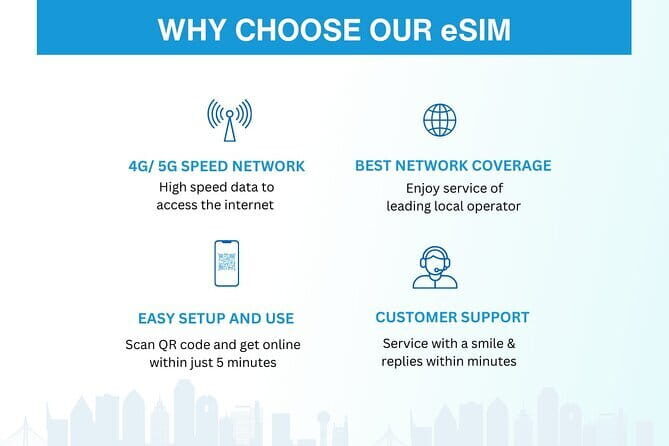
The biggest practical win here is that you can get connected fast. The service delivers your eSIM by email, and activation is a QR scan process. If you’ve ever arrived tired and then had to manage a physical SIM purchase and setup, you’ll understand why this matters. Less friction usually means more time moving through the city on your schedule.
I also like that this isn’t an old-school “buy a card, then pray it works” type of setup. The plan is designed to provide mobile data for your selected duration, and your phone uses the eSIM profile you activate. The end result is that you can stay in contact with friends and family, find your way around town, and keep using data for planning without switching SIMs.
You can also read our reviews of more tours and experiences in Seoul.



Price, Data Limits, and What Up to 45GB Really Means
The headline is simple: the price is $5.00 per person for a plan running 3 to 30 days, with up to 45GB of high-speed data. That’s good value if your phone is your main tool for navigation and communication.
Here’s how to think about that data cap in real use. High-speed data is for the included amount, and after you use it, your speed switches to 3G. That doesn’t mean you go offline. It means heavy tasks—streaming video, high-quality video calls, large downloads—may get slower once you hit the limit.
So the real question for you is not only how many days you’re staying, but how you use your data:
- If you mostly text, check maps, and stream occasional clips, you’re often fine with a mid-to-high data allotment.
- If you plan to do lots of streaming or frequent video calls, you’ll want to choose your duration option carefully so your high-speed allocation matches your trip style.
If you’re the type who uses your phone for everything, you’ll probably appreciate having the 45GB ceiling available on the longer end of the 3–30 day range. Just remember that “up to” implies the plan size depends on the option you select.
Activation Timing: Email Delivery, QR Scan, and a Possible Restart
This is a digital product, so your timeline matters. After booking, you receive confirmation at the time of purchase, and you get the eSIM itself by email. The process is designed to be straightforward:
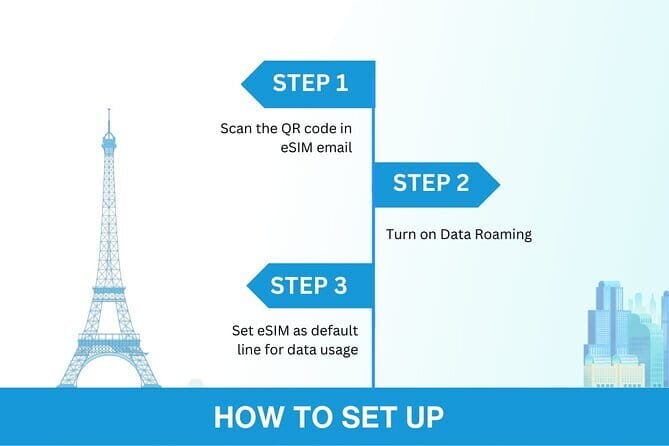
- Scan the QR code included with your eSIM instructions
- Activate the eSIM profile on your phone
- Connect and use mobile data
One tip from real-world usage that’s worth taking seriously: when you land, you may need to turn on data roaming. That’s common when a device hasn’t been using a roaming-capable profile yet, even if the eSIM is already installed.
Another detail to keep you from wasting time: if the connection feels stuck, plan on restarting your device after activation. One reported workaround is that a restart helps the eSIM fully take effect. That’s a low-effort fix, and it’s much faster than trying random settings changes for an hour.
4G/5G Performance in Seoul, Including Day Trips
The plan covers 4G/5G (where available). In practical terms, that’s your expectation for everyday speed—maps loading quickly, translating pages and menus, messaging with minimal delay, and generally smooth browsing.
A standout point is how the connection behaves once active. The setup is intended to connect to the appropriate network automatically, so you don’t have to do manual selection. That kind of automation matters when you’re moving around—especially if you’re not spending your trip time fiddling with network settings.
Coverage details in the supplied information point to performance you can rely on in real scenarios. Strong connection was reported in Seoul and even on a trip to Jeju island. You should still treat wireless coverage as something that can vary block to block, but the overall message is clear: this eSIM isn’t only a theoretical product. It’s designed to give you usable data across common destinations around Korea.
A quick note on one confusing line
The product text also says the data plan covers all Canadian provinces. That doesn’t fit with a South Korea trip at first glance. Before you rely on it, it’s smart to confirm with the provider what regions this plan is intended for, just to avoid surprises on arrival. (Yes, it’s odd—so take thirty seconds to verify.)






What Happens After You Hit the Data Cap
The plan is clear about the limits: high-speed data is capped, and after you use the included amount, your speed drops to 3G.
This matters because 3G can still be useful. If your main needs are messaging, basic browsing, email refresh, and map checks, you may not feel completely cut off. The slowdown tends to show up when you ask the network to do heavier work.
If you want to avoid hitting the cap early, a few practical strategies help:
- Use Wi‑Fi when you’re at your hotel (if available) to save mobile data.
- Download essential offline map areas before you go out, so you’re not relying on fast data for every turn.
- If you’ll do video calls, be mindful of how many and how long they are.
Also, choose the right duration. A shorter plan can be cheaper in some systems, but this service is priced for the idea of matching your trip length (3 to 30 days). The best value comes when your high-speed allotment fits your habits.
Phone Compatibility: The eSIM Requirement That Can Trip You Up
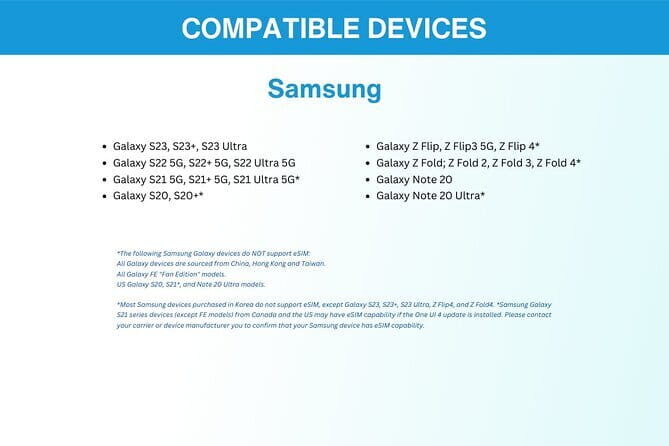
This only works if your phone supports eSIM. The info provided lists common compatible models:
- iPhone XS and later
- Pixel 3 and later
- Samsung S20 / S21 / Fold
If your phone isn’t on that list, don’t guess. The service specifically says you should contact them in advance if you’re unsure. That’s an important safety step because an eSIM setup can be quick—but it won’t matter if your phone can’t install eSIM profiles in the first place.
Remote Customer Service That Can Save Your Day
No physical pickup means everything depends on digital setup. The service includes remote customer support by email, which is exactly what you want when you’re standing at the airport or in your first hours in Seoul.
If activation doesn’t behave how you expect, here’s what you can do immediately before you message support:
- Make sure your eSIM profile is actually active
- Turn on data roaming once you’re in Korea
- If it still feels slow or offline, try the simple fix: restart your device
Remote support is best used when you’re ready with basic details: the phone model you’re using, the duration option you selected, and what step failed (QR scan, activation, or connection). Since the service is delivered digitally, getting help quickly is mostly about giving clear info.
Who This South Korea eSIM Is Perfect For (and Who Should Think Twice)

This eSIM is a strong fit if you:
- Want data for Seoul navigation and day-to-day planning
- Don’t want to deal with airport SIM counters
- Need dependable messaging and connectivity while traveling
- Prefer installing something once, then forgetting about it for the trip
- Plan to do regular online tasks like streaming and video calls (within the data limit)
It’s also ideal if you’re the “one phone does everything” type—because the whole point is staying connected for your route planning and staying in touch with family.
You might think twice if:
- Your phone doesn’t support eSIM and you don’t want to swap to a different device
- You’re planning extremely heavy streaming without access to Wi‑Fi and you don’t want to manage a data cap
- You prefer a physical SIM setup for peace of mind (even though the convenience here is a big part of the value)
Should You Book Xplori’s South Korea eSIM?
If you want the simplest possible way to get data in Seoul, I’d lean yes—especially at $5.00 per person. The value is strongest when you use your phone often for maps, communication, and planning, and when you’re happy with a capped high-speed allowance that drops to 3G after.
Before you hit purchase, double-check two things:
- Your phone is on the compatible eSIM list (or ask support if you’re not sure)
- You understand the data cap and pick the duration option that matches your trip length and streaming habits
If that all checks out, this is the kind of travel tech that quietly makes your trip easier. Less airport stress. Less SIM juggling. More time doing the fun part in Seoul.
FAQ
How do I get the eSIM for South Korea?
You receive the eSIM delivery by email after you order. You’ll use the information sent to you to activate the eSIM profile.
How do I activate the eSIM when I’m in Seoul?
Scan the QR code that comes with the eSIM instructions, activate the eSIM profile on your phone, and then be connected within minutes.
Do I need to buy a physical SIM in Seoul?
No. This is a digital product with no pickup or meetup, and there’s no physical SIM to pick up.
What phones are compatible with this eSIM?
The details provided list iPhone XS and later, Pixel 3 and later, and Samsung S20 / S21 / Fold as compatible models.
Does it include customer support?
Yes. The experience includes remote customer service, and you can contact them by email.
What kind of data speed should I expect?
You can use 4G/5G where available during your trip. High-speed usage is limited to the amount included in your selected plan.
What happens after I use up my high-speed data?
After your high-speed data cap is used, your data speed switches to 3G.
Do I need to turn on data roaming after landing?
The provided information says that when you land, you need to turn on your data roaming to get things working.
What is the cancellation policy?
You can cancel for a full refund if you cancel up to 24 hours in advance of the experience’s start time. If you cancel later than that, the amount paid won’t be refunded.